![Infinity Box Dongle #CM2 [BEST] Support](./styles/simplicity_blue/theme/images/logo.png)
Steps to get problem solved:Waiting for device...
Device found; PTFN: SPRD U2S Diag (COM7) 1782:4D00
...
Handshake... Fail
...
1. Hold Volume Up or Volume Down key to connect
or
2. Use Test-Point. How to get Test Point
or
3. Use [ADL] Boot Mode
Problem:
Steps to get problem solved:Waiting for device...
Device found; PTFN: SPRD U2S Diag (COM5) 1782:4D00
boot: SPRD3
C:\InfinityBox\CM2SP3\boot\Tecno\pop-8\fdl1-sign.e1ea5a12.ldr
C:\InfinityBox\CM2SP3\boot\Tecno\pop-8\fdl2-sign.e1ea5a12.676548c9.2024-01.ldr
Boot[1] [+] Custom... Ok
Exec[1]...
PORT Tx 0x79 The semaphore timeout period has expired... Fail
1. Be sure you have selected correct model. See 1. at picture below.
2. Select another FDL loader from the list. See 2. at picture below. How to get new FDL loaders
3. Change Custom to Factory. See 3. at picture below.
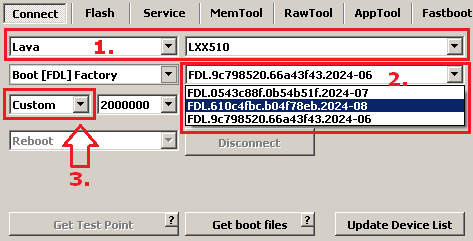
Click to [Get boot files] to get latest boot files from server.