![Infinity Box Dongle #CM2 [BEST] Support](./styles/simplicity_blue/theme/images/logo.png)
Unlock BOOTLOADER and check that bootloader is unlocked otherwise your will get dead phone.
See here how to be sure BOOTLOADER UNLOCKED.
[AppTool] - Debloater tool
-
Support
- Posts: 3632
- Joined: 19 Oct 2011, 20:27
- Contact:
-
Support
- Posts: 3632
- Joined: 19 Oct 2011, 20:27
- Contact:
Re: [AppTool] for #CM2MT2 and #CM2SP3
[AppTool] features:
- Print list of available/installed APK
- Disable any (even system) APK pernamemntly
- Disabled APK stay disabled even after Reset or Wipe
- Save list of installed APK to file
- Restore disabled APK back anytime
- Extremely fast processing
What you can do with [AppTool]
- OTA On/Off
- MDM/Admin Apps On/Off
- Bloatware/Telemetry/Spy Apps On/Off
- Network/Operator addons On/Off
- And many more features depends on your fantasy
Bootloader must be unlocked for this operation!
As a first step - unlock Bootloader.
Try to Power set On after that. If Bootloadr unlocked well - you can continue with [AppTool]
How to use CM2 [AppTool]
Click to [Connect]
Go to [AppTool]
Click to [Load Apps]
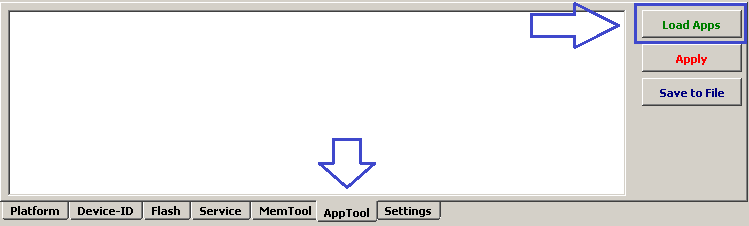
4. Make App On [v] or Off [ ]
5. Click to [Apply]
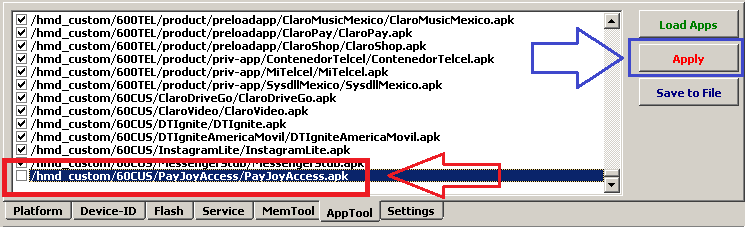
Disconnect device and check it after you disable each App!
Do not disable many Apps at once, you have to be sure what App make device locked.
Right mouse click open menu with more features:
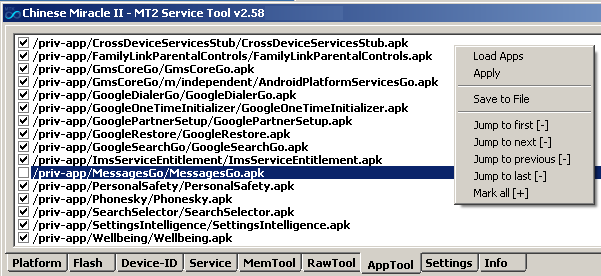
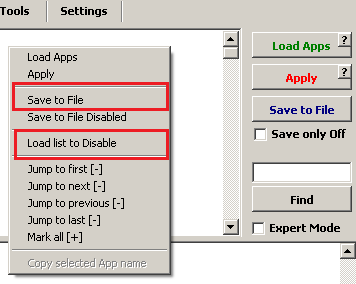
Once you disabled required Apps you can save list to file.
And when you will get another the same phone model you can click to [Load list to Disable] to make many Apps Off as per loaded pattern.
- Print list of available/installed APK
- Disable any (even system) APK pernamemntly
- Disabled APK stay disabled even after Reset or Wipe
- Save list of installed APK to file
- Restore disabled APK back anytime
- Extremely fast processing
What you can do with [AppTool]
- OTA On/Off
- MDM/Admin Apps On/Off
- Bloatware/Telemetry/Spy Apps On/Off
- Network/Operator addons On/Off
- And many more features depends on your fantasy
Bootloader must be unlocked for this operation!
As a first step - unlock Bootloader.
Try to Power set On after that. If Bootloadr unlocked well - you can continue with [AppTool]
How to use CM2 [AppTool]
Click to [Connect]
Go to [AppTool]
Click to [Load Apps]
4. Make App On [v] or Off [ ]
5. Click to [Apply]
Disconnect device and check it after you disable each App!
Do not disable many Apps at once, you have to be sure what App make device locked.
Right mouse click open menu with more features:
Once you disabled required Apps you can save list to file.
And when you will get another the same phone model you can click to [Load list to Disable] to make many Apps Off as per loaded pattern.
-
Support
- Posts: 3632
- Joined: 19 Oct 2011, 20:27
- Contact:
Re: [AppTool] (Debloater tool) #CM2MT2 and #CM2SP3
If you do not know what App should be disabled:
go to [AppTool] and make [Expert Mode] mode checked
click to [Load Apps]
click to [Save To File]
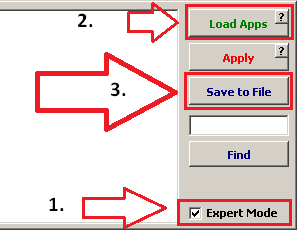
Drop FILE and explanation to chat https://t.me/InfinityBoxTalks
go to [AppTool] and make [Expert Mode] mode checked
click to [Load Apps]
click to [Save To File]
Drop FILE and explanation to chat https://t.me/InfinityBoxTalks