SPD/Unisoc boot with CM2SP3 [FDL] [FF] [ADL] boot modes. Test-Point and Volume Up/Down keys
Posted: 09 Jul 2025, 12:53
Run CM2SP3 and make the next steps one-by-one:
Select [FDL] or [FF] boot. Do not touch any phone key. Connect USB cable to phone.
If you see Handshake error: Disconnect cable. Press and HOLD phone Volume UP key. Click to Connect button. Connect USB cable to phone.
If you see Handshake error: Disconnect cable. Press and HOLD phone Volume DOWN key. Click to Connect button. Connect USB cable to phone.
If you see Handshake error: Disconnect cable. Select [ADL] boot at top left. Do not touch any phone keys. Connect USB cable to phone.
If you see Handshake error: Disconnect cable. Open phone, connect Test-Point to Gnd. Connect USB cable to phone. Disconnect test-Point right after you see Handshake... Ok
[ADL] boot may works for some models and it depends on sec patch or manufacturer.
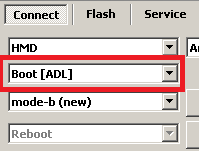
in some cases [ADL] may be useful due to TP is not required for it but the same mode may need TP for [FF] or [FDL].
If you have an issue with [ADL] connection you should use [FF] or [FDL] boot mode as before, probably with Test-Point
How to connect via [ADL]
1. Power phone Off
2. Select [ADL]
3. Select [mode-a] or [mode-b] - try both one by one in case of connection fault
4. Click to [Connect]
5. And connect cable to phone
Now wait. If device supported it will be connected otherwise you will see error messages.
Select [FDL] or [FF] boot. Do not touch any phone key. Connect USB cable to phone.
If you see Handshake error: Disconnect cable. Press and HOLD phone Volume UP key. Click to Connect button. Connect USB cable to phone.
If you see Handshake error: Disconnect cable. Press and HOLD phone Volume DOWN key. Click to Connect button. Connect USB cable to phone.
If you see Handshake error: Disconnect cable. Select [ADL] boot at top left. Do not touch any phone keys. Connect USB cable to phone.
If you see Handshake error: Disconnect cable. Open phone, connect Test-Point to Gnd. Connect USB cable to phone. Disconnect test-Point right after you see Handshake... Ok
[ADL] boot may works for some models and it depends on sec patch or manufacturer.
in some cases [ADL] may be useful due to TP is not required for it but the same mode may need TP for [FF] or [FDL].
If you have an issue with [ADL] connection you should use [FF] or [FDL] boot mode as before, probably with Test-Point
How to connect via [ADL]
1. Power phone Off
2. Select [ADL]
3. Select [mode-a] or [mode-b] - try both one by one in case of connection fault
4. Click to [Connect]
5. And connect cable to phone
Now wait. If device supported it will be connected otherwise you will see error messages.