![Infinity Box Dongle #CM2 [BEST] Support](./styles/simplicity_blue/theme/images/logo.png)
1. Unlock BOOTLOADER and be sure BOOTLOADER IS REALLY UNLOCKED
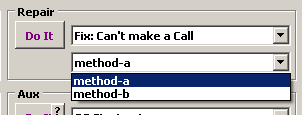
2. Service > Account / Lock > MDM or EasyBuy or M-Kopa or PayJoy
Click to Do It
3. Insert SIM Card, Power phone On
Connect to WiFi or to Mobile Network. Wait some time and be sure that device is not relocked.
If you are not lucky and device become relocked after it was connected to Network - use [AppTool]
How to find and Disable Admin App with [AppTool]
How to PERMANENTLY reset MDM, payjoy, easybuy, m-kopa, Security Plugin, softlock
-
Support
- Posts: 3632
- Joined: 19 Oct 2011, 20:27
- Contact:
-
Support
- Posts: 3632
- Joined: 19 Oct 2011, 20:27
- Contact:
-
Support
- Posts: 3632
- Joined: 19 Oct 2011, 20:27
- Contact: