How to boot MTK with #CM2MT2

Locked
Support
Posts: 3841
Joined: 19 Oct 2011, 20:27
Contact:

How to boot MTK with #CM2MT2

Post by Support »

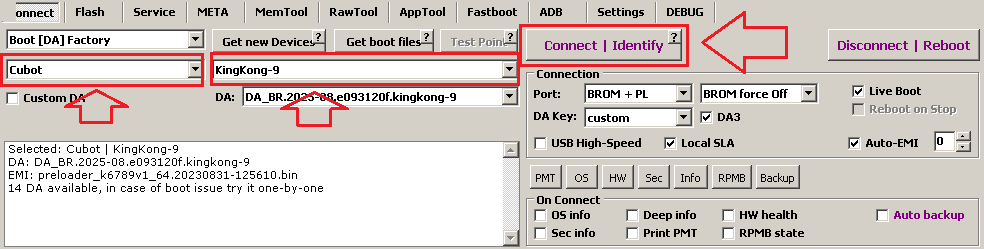
At top left select device BARND and MODEL

Image

If you do not know what to select just use defaults:
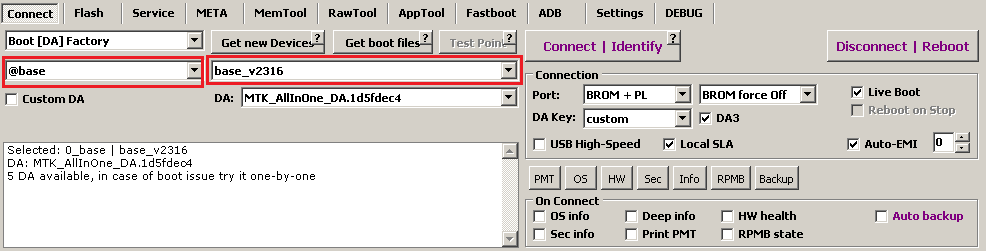
Image

Power device Off
Click to [Connect] button and Insert USB cable.
In most cases everything will be Ok and you will see Boot Ok text.
Support
Posts: 3841
Joined: 19 Oct 2011, 20:27
Contact:

Re: #CM2MT2 boot solution

Post by Support »

Problem:
...
Send DA1... Ok [Adjusted 1|2: Untold|Untold]
Jump to DA... Ok
Sync... Ok
DA version is older than required by device
or
...
Send DA1...
port reset(1)... Fail
DA1 send fail: [0x00000001] DEVICE NOT FOUND
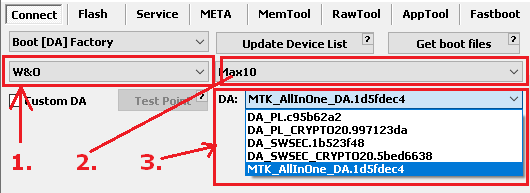
Solution:

Select another brand (1), model (2) or DA (3)

Image
Support
Posts: 3841
Joined: 19 Oct 2011, 20:27
Contact:

Re: #CM2MT2 boot solution

Post by Support »

Problem:
Waiting for device...
[PRELOADER]...
Waiting for boot Ack...
Handshake... Ok
Jump to BROM
Wait for port... nOk
SoC is not detected
...
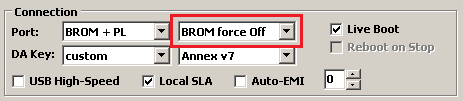
Solution:

Set [BROM force Off]

Image
Support
Posts: 3841
Joined: 19 Oct 2011, 20:27
Contact:

Re: #CM2MT2 boot solution

Post by Support »

Next try:
Power device Off. Press and hold Volume UP key
Insert cable. You must see [BOOTROM] connection but not [PRELOADER]

Next try:
Power device Off. Press and hold Volume DOWN key
Insert cable. You must see [BOOTROM] connection but not [PRELOADER]

Next try:
Power device Off. Press and hold Volume UP key + Volume DOWN key
Insert cable. You must see [BOOTROM] connection but not [PRELOADER]


Next try:
Use TEST-POINT
Support
Posts: 3841
Joined: 19 Oct 2011, 20:27
Contact:

Re: #CM2MT2 boot solution

Post by Support »

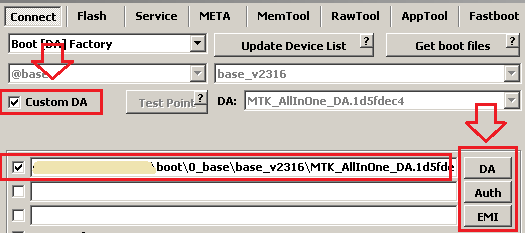
How to use custom/own DA files with #CM2MT2:


Image
Locked