CM2 MTK boot and Reset FRP for tecno, infinix, itel, viallon
Posted: 19 Feb 2025, 15:36
Tecno/Infinx/Itel with firmware date newer than 2024-10 got new sec. patch and CAN NOT be connected in BOOT mode.
Use [META] mode for now for number of functions.
If you want to flash this phone you may search for Auth service, do not ask us where to get it, we do not provide and do not sell it.
How to know tecno/infinix/itel firmware date:
Hold [Vol Up] and press [Power] key
Once you will see "No command" text press and hold [Power] and press [Vol Up] once
If OS date is older than 2024-10 click HERE
If device OS date is newer than 2024-10 and you can not connect phone well it means it's currently unsupported device.
For FRP, Device-ID and some other functions for latest devices:
1. Run CM2MT2
2. Enter META MODE
3. Click to [Service] and select FRP META
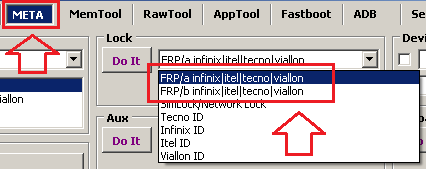
4. Make frp/a, in most cases it helps
5. If frp/a gives and issue you can try frp/b but some devices may get problem with google account after that.
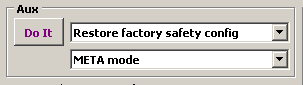
In case of issue like missing [Startup Wizard] or [google account] problem or something like that use the next function to restore normality:
Click to [Service] and select [Restore factory safety config]
Use [META] mode for now for number of functions.
If you want to flash this phone you may search for Auth service, do not ask us where to get it, we do not provide and do not sell it.
How to know tecno/infinix/itel firmware date:
Hold [Vol Up] and press [Power] key
Once you will see "No command" text press and hold [Power] and press [Vol Up] once
If OS date is older than 2024-10 click HERE
If device OS date is newer than 2024-10 and you can not connect phone well it means it's currently unsupported device.
For FRP, Device-ID and some other functions for latest devices:
1. Run CM2MT2
2. Enter META MODE
3. Click to [Service] and select FRP META
4. Make frp/a, in most cases it helps
5. If frp/a gives and issue you can try frp/b but some devices may get problem with google account after that.
In case of issue like missing [Startup Wizard] or [google account] problem or something like that use the next function to restore normality:
Click to [Service] and select [Restore factory safety config]