How to Unlock Bootloader and fix "Your device is corrupt" and "Red State"
Posted: 28 Aug 2024, 18:30
How to Unlock Bootloader for SPD/Unisoc
Bootloader unlock is free.
For number of models, f.e. tecno/infinix/itel/viallon you must enter your Infinty Account Username and Password and use server connection.
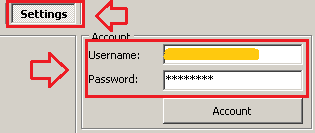
CM2SP3 > Connect > Service > Unlock BL > Method A > Do It
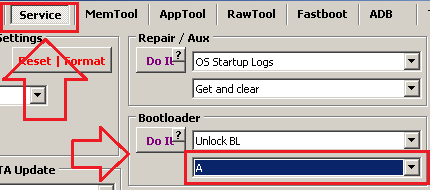
Power phone On and check bootlogo.
If no UNLOCK!!! text on bootlogo: CM2SP3 > Connect > Service > Unlock BL > Method B > Do It
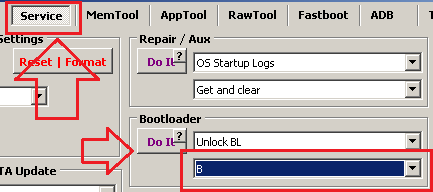
Power phone On and check bootlogo.
If no UNLOCK!!! text on bootlogo: Send report to Telegram Chat
1. Software log text for bootloader unlock process
2. Firmware version and model name. You can get both via DIAG mode at top left > Connect

How to Unlock Bootloader for MTK
For tecno/infinix/itel/viallon enter your Infinty Account Username and Password
CM2MT2 > Connect > Service > Unlock BL > Do It
Bootloader unlock is free.
For number of models, f.e. tecno/infinix/itel/viallon you must enter your Infinty Account Username and Password and use server connection.
CM2SP3 > Connect > Service > Unlock BL > Method A > Do It
Power phone On and check bootlogo.
If no UNLOCK!!! text on bootlogo: CM2SP3 > Connect > Service > Unlock BL > Method B > Do It
Power phone On and check bootlogo.
If no UNLOCK!!! text on bootlogo: Send report to Telegram Chat
1. Software log text for bootloader unlock process
2. Firmware version and model name. You can get both via DIAG mode at top left > Connect
How to Unlock Bootloader for MTK
For tecno/infinix/itel/viallon enter your Infinty Account Username and Password
CM2MT2 > Connect > Service > Unlock BL > Do It